
Technical Parameters:
NO1.Controller Parameters
- Working Voltage: 5V~24V DC
- Data Type: SPI
- Working Current: 14mA~20mA
- IC Type: Single-wire RZ LED driver IC
- Working Temp: -10℃~40℃
- MAX Channels: 1800
- Dimension: 56mm*21mm*12mm (Not including the wires)
NO2. Remote Control Parameters
- Working Voltage: 3V(CR2025)
- Static Current: 1uA
- Transport: 2.4G
- Remote Distance: 30M (Open space)
- Dimension: 103mm*45mm*8.5mm
Note:Restore Factory Settings
Plug and unplug the power 5 times consecutively → Each power-on lasts approximately 1–2 seconds and must not exceed 5 seconds (exceeding 5 seconds resets the count) → Each power-off lasts at least 2 seconds → After 5 cycles, the white light flashes 3 times to indicate a successful reset.
Brief:
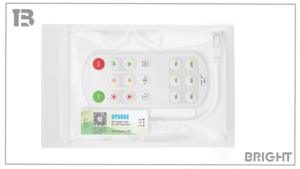
SP666E SPI Single Color BT LED Controller that supports control via mobile App and 2.4G remote. App features an intuitive UI for visualized lighting effect previews and offers a variety of built-in dynamic white light and music rhythm effects, creating lively and versatile lighting scenes.
Features:
- Supports two convenient control methods: App control and 2.4G RF remote control.
- All-new scene-based app UI design with support for scene switching, lighting effects can be previewed in real time for clear and intuitive visibility.
- Powered by SPI control, it delivers a wide range of dynamic white light and music effects, offering diverse lighting modes.
- Supports personalized favorites, allowing users to create a custom lighting effect list with loop playback and timer settings.
- Supports customizable power-ON/OFF effects and startup state settings.
- Supports device group management, scheduled power-ON/OFF, and automatic reconnection.
- Supports OTA updates, ensuring your device stays with the latest features and improvements.
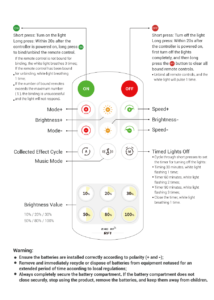
Work With 2.4G Remote Control:
The 2.4G remote control model (RF1) compatible with SP666E:
Support one-to-many control, one remote control can control multiple controllers;
Support many-to-one control, each controller can bind up to 5 remote controls.
For more information, please contact customer service to obtain the product manual